I Replaced Jira in My Studio With an App I Built in Three Evenings

For years, my music production lived in Jira. Every song a ticket, every mixdown a status change, every “does this still sound good in the car?” a comment nobody would ever find again. It worked. Sort of. The way a Swiss Army knife works as a screwdriver.

Three evenings with Claude Code later, I don’t need it anymore. Meet Foton Kanban: a native macOS kanban app built for exactly one use case — mine.

What it is

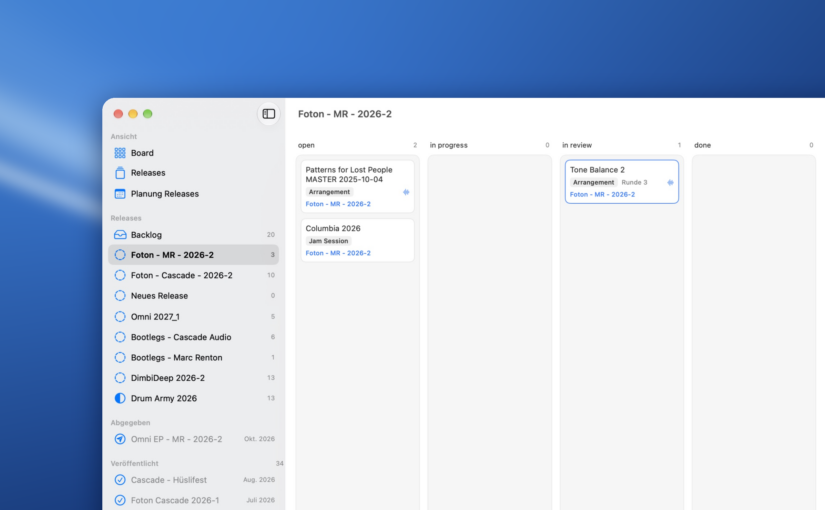
One card is one song. Four columns: open, in progress, in review, done. Whatever sits at the top of a column is what I work on next — position is priority.
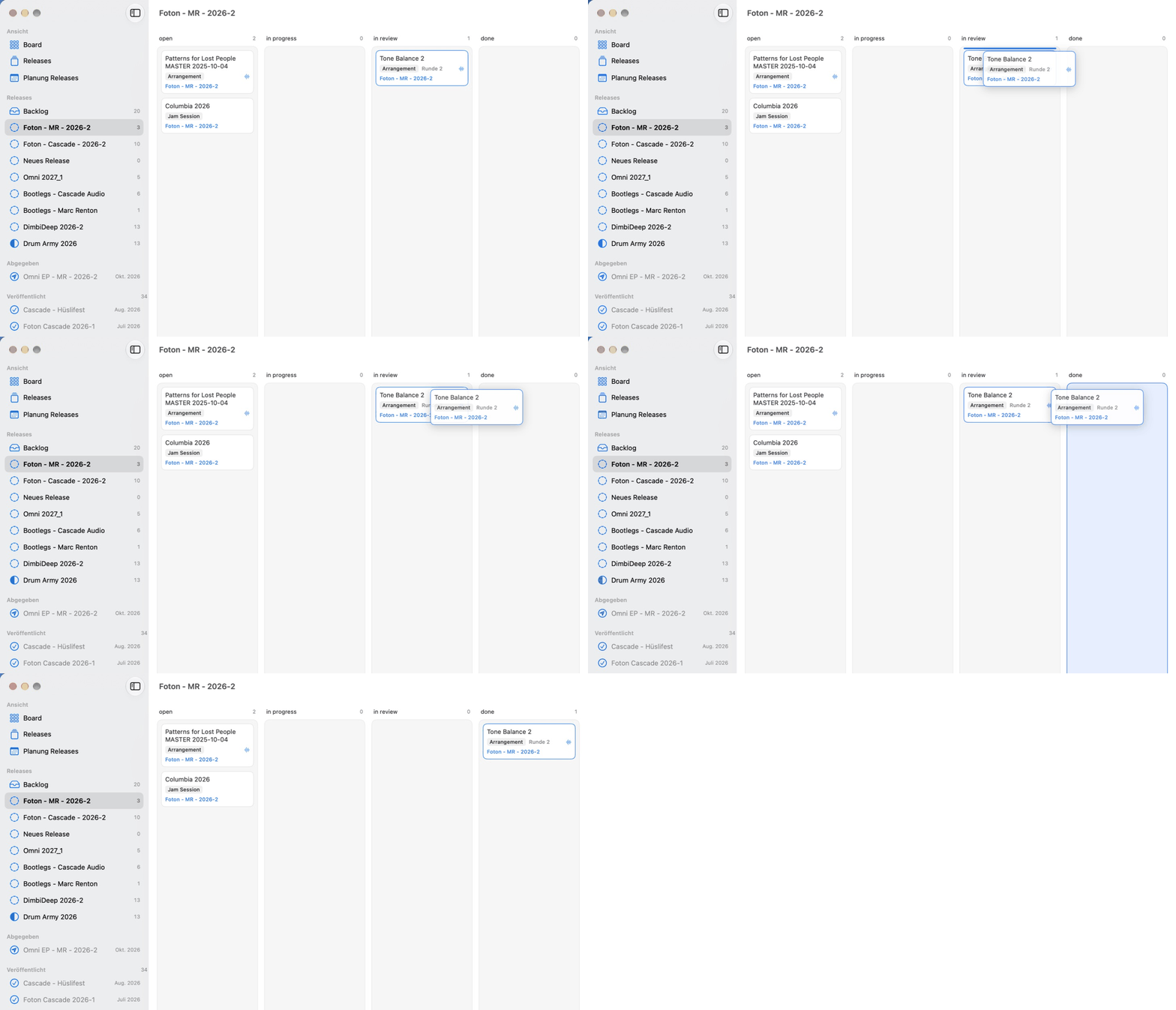
Foton Kanban: dragging the track "Tone Balance 2" from "in review" to "done" on the board
One card is one song: drag it to the next column, and the board does the rest.

Each track carries its production phase as a badge: Jam Session, Arrangement, Mixdown, FX finalizing, Mastering. And there’s exactly one automatic rule: when I drag a track from review to done, the review counts as passed. Before mastering, the track moves up one phase and goes back to work. After mastering, it’s finished.

The code is open source under GPL-3.0: github.com/andremotz/foton-kanban

Why not just use Jira?

Because Jira doesn’t know what a studio is. These are the things I actually wanted — and no big vendor will ever build them for me:

  • A listening checklist per track. Car, AirPods, headphones, studio, and the master heard 45° off-axis from the speaker. The card shows 2/5 while a track is in mastering. If you produce music, you know why this matters. If you sell project management software, you’ll never care.
  • Phases as an attribute, not a workflow. A track that fails review goes back to “in progress” and keeps its phase. No custom workflow scheme, no admin console, no consultant.
  • My data in plain Markdown. One file per track, in a folder I choose — Nextcloud, iCloud, or a Git repo. No database, no server, no account. The data will outlive the app, and that’s the point.

That last one is the real anti-SaaS argument. Every board action touches exactly one file. There’s no central index for two machines to fight over. And if I stop using Foton Kanban tomorrow, I still have a folder full of readable text files.

I even wrote a Jira importer, so moving out took one command.

How it was built: three evenings, three iterations

I built Foton Kanban with Claude Code. Not as a one-shot prompt, but the way I’d run any software project — just with a much shorter feedback loop.

  1. Spec first. Before any code, I wrote down the data model and the reasoning behind it. That document became SPEC.md in the repo. It’s the most important file in the project, because it tells the AI why, not just what.
  2. Then iterate. Three evenings, three rounds: build, use it on real tracks, notice what’s missing, refine.

The skill that mattered wasn’t writing Swift. It was knowing what I wanted, and being precise about it. Architecture decisions like “one action, one file” came from me. The typing came from Claude.

Is SaaS dead?

Not all of it. But the long tail is.

For two decades, the deal was simple: building your own tool was expensive, so you rented a generic one and bent your workflow to fit it. You paid for a thousand features to use twelve. You accepted the vendor’s data model, their pricing changes and their roadmap.

AI-assisted development breaks that math. When a tailored tool costs three evenings instead of three months, the question flips. It’s no longer “which product fits me best?” but “what exactly do I need?” — and that question has always had a better answer than any product catalog.

I think we’ll see a lot more of this: small, personal, purpose-built software. Not products. Tools. The kind you build for yourself, the way a carpenter builds a jig for one specific cut.

When you should still pay for SaaS

I work in enterprise IT during the day, so let me be honest about where this stops working:

  • Teams. Foton Kanban is single-user by design. Permissions, audit trails and twenty people editing the same board are real problems that vendors solve well.
  • Compliance and support. If something breaks at 2 a.m., I’m the support hotline. For a hobby studio that’s fine. For a regulated business it isn’t.
  • Maintenance. Custom software is a pet, not a purchase. Someone has to keep it alive when macOS or the toolchain changes.

So the rule of thumb: if the tool is core to your workflow and only you use it, build it. If it’s shared infrastructure, buy it.

Take it, fork it, make it yours

Foton Kanban isn’t meant to be your next productivity app. It’s meant to be a template — proof that your own tool is closer than you think. Fork it, rip out the studio stuff, and build the board your work needs. It’s the same itch that made me build FCATS instead of buying an off-the-shelf camera app.

If you want to run it as is: you’ll need macOS 14+ and Xcode to build it. The README has everything else, including a sample board to play with.

And if you build your own version of something you used to rent — let me know in the comments. I’d love to see it.

FCATS Update: Edge AI Gets a Serious Boost


When I first built FCATS Katzenschreck, it was a fun proof of concept — a headless, AI-powered cat detection system running on small edge devices.

Now, it’s faster. Much faster.


🧠 From Raspberry Pi to Jetson Xavier NX

I’ve ported the entire inference script into a Docker container running on an NVIDIA Jetson Xavier NX Developer Board. The performance jump is incredible:

DeviceModelInference Time
Raspberry Pi 3YOLOv11x~50 seconds per frame
Raspberry Pi 4YOLOv11x~18 seconds per frame
Jetson Xavier NXYOLOv11x188 ms per frame

That’s not just faster — it’s real-time.

The Jetson can even host multiple inference containers simultaneously, so scaling across multiple cameras is finally practical.


🐈 Training with Real-World Data

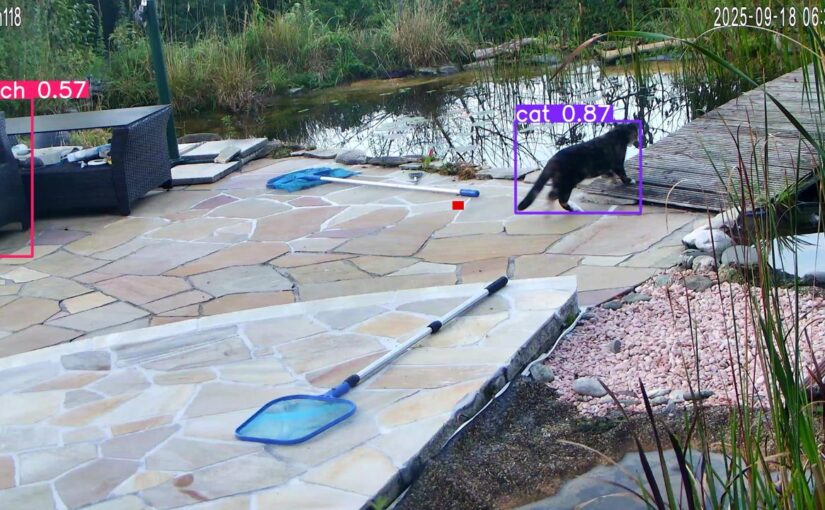
Over the last two months, Katzenschreck has been quietly watching (24/7) a specific outdoor spot — collecting data on feline intruders.

I used this footage (~4.5 GB of JPEG frames) to fine-tune my model:

  • Re-labeled the dataset for precision.
  • Added data augmentation (lighting, perspective, random occlusion).
  • Retrained using YOLOv11x with my own MLOps pipeline for regular re-training.

The result? The system now detects cats more reliably, even in poor lighting or partial occlusions — and false positives dropped noticeably.


🧰 What’s Next

Next up, I’ll publish a detailed look at my improved model performance metrics — including confidence scores, precision-recall curves, and a few live comparison demos.

Stay tuned — and if you’ve ever wanted to see what happens when DevOps meets wildlife control, this might be the most overengineered example yet 😄

Update, 2025-12-23: Attached you can find my trained model that improved my accuracy by +10%: https://www.andremotz.com/wp-content/uploads/2025/12/best.pt_.zip

FCATS: My Quest to Outsmart Cats with Code


So, you know how some people spend their free time knitting, doing CrossFit, or collecting rare stamps? Well, I decided to build a system to scare away cats. Yes, really. It’s part AI, part DevOps playground, part “please don’t ask me how I got here.”

Why am I doing this?

Let me introduce you to FCATS: (a) Fully Configurable Automated Tracking Software

  1. Because cats kept showing up in places they shouldn’t: They leave things in the garden that they should rather dispose of in the litter box, or steal fish from the pond that don’t belong to them.
  2. Because I needed a fun, hands-on project that mixes computer vision, monitoring, and automation.
  3. Because “Katzenschreck” just sounds too good not to be a project name.


The result: a full stack of open-source tools that combine AI object detection, monitoring, and benchmarking into one gloriously over-engineered cat deterrent.

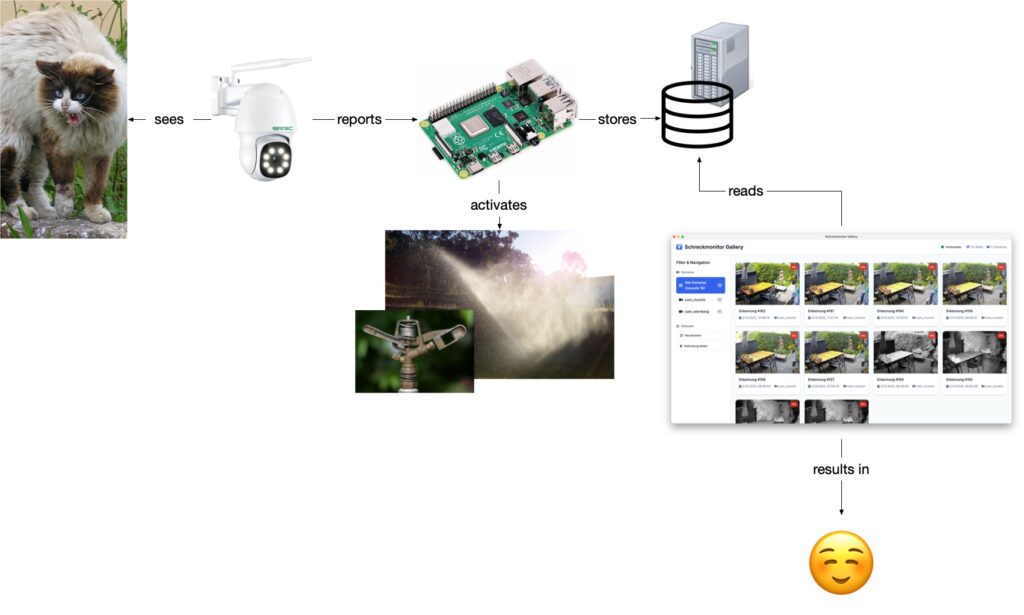
Katzenschreck - functional Architecture. The ip camera records a cat, connected to a Raspberry Pi, that runs the Computer Vision inference. If a cat was detected, the sprinkler can be activated via home automation. Pictures are stored in a database and can be observed via a surveillance software.

Why Katzenschreck Stands Out 🚀

The unique selling point of my solution is that it runs headless on small edge devices while integrating cutting-edge models like YOLOv12x. This makes it easy to deploy in multi-location and multi-camera setups. Unlike more user-focused tools like Frigate, Katzenschreck is designed to fit into existing IT infrastructure — following enterprise-grade architecture principles with DevOps workflows, Docker containers, and Kubernetes clusters. In short: it’s not just a tinkering project, but a system built to scale.

The Repos 🐾

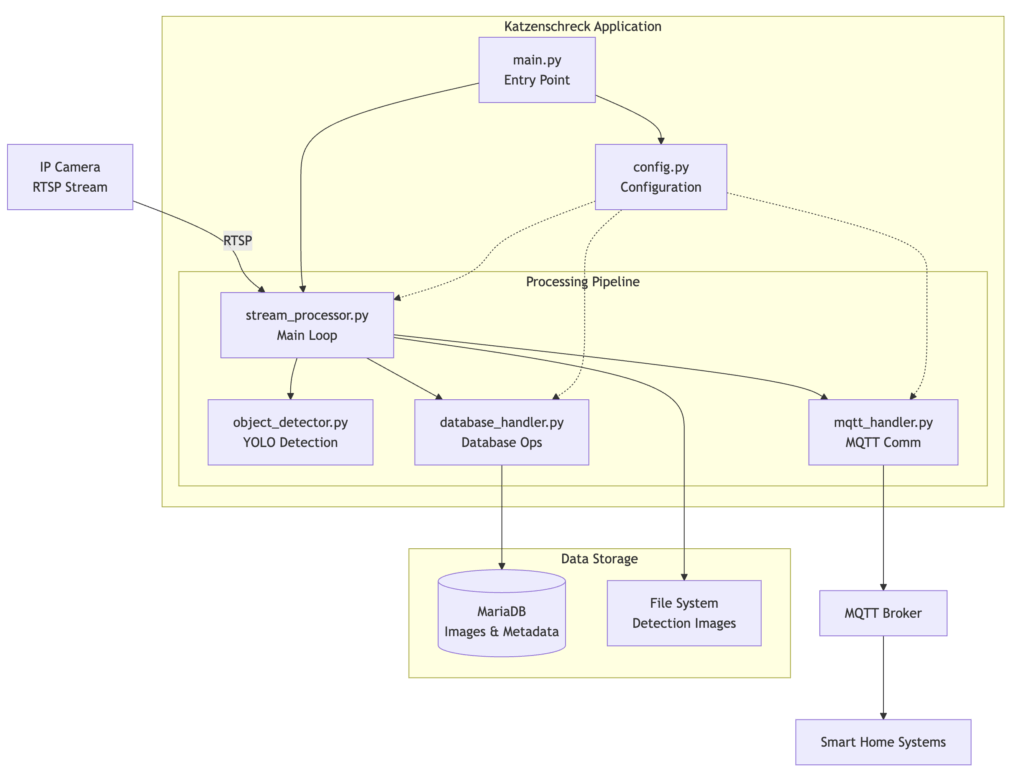
Detailed Spftware Architecture
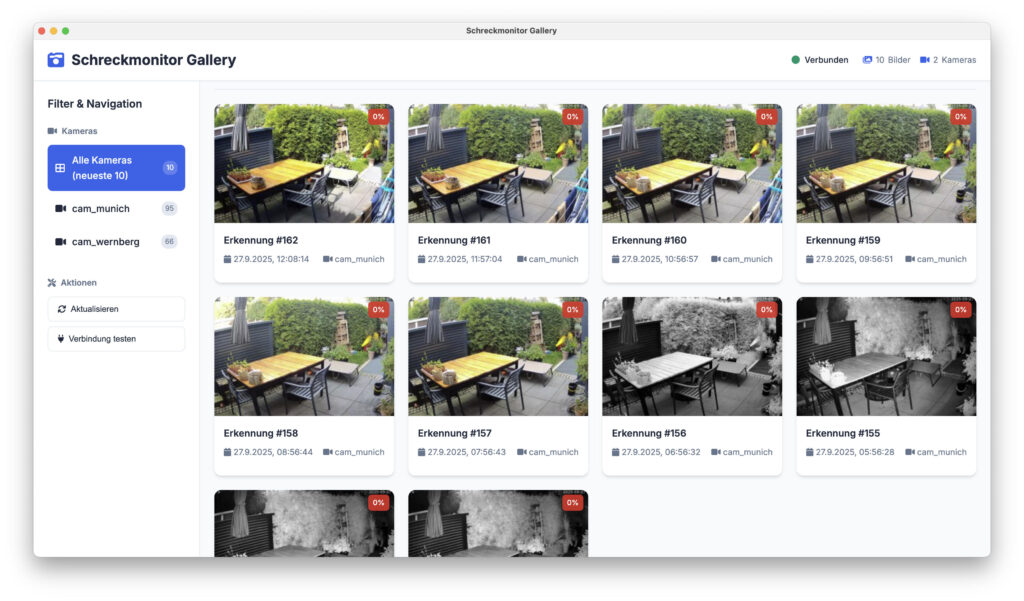
Schreckmonitor Screenshot on mac
Schreckmonitor: A nextGen Cat-surveillance monitor


It’s not only about showing off AI tinkering, but also CI/CD pipelines, monitoring setups, and how to package weird ideas into working systems.


Stay tuned, because the cats certainly will.

Update, 2025-12-23: Attached you can find my trained model that improved my accuracy by +10%: https://www.andremotz.com/wp-content/uploads/2025/12/best.pt_.zip

Switch your lights automatically: ESP32cam, Node-RED & Raspberry Pi

Ever wanted to control your light automatically when it is too dark outside? You want to start a project based on an ESP32 and fancy IoT-home automation via Node-RED? Then this small project is for you!!

Continue reading Switch your lights automatically: ESP32cam, Node-RED & Raspberry Pi

Sneak peek: Orbital, a N-Body Gravitation simulator

Don’t you feel worried that there is no guarantee that our Earth might be kicked out of our solar system? Did you ever wanted to send a rocket to the Moon or Venus? If so, then you should have a closer look to my current Python/Visualising Data-project.
Check it out on my GitHub!

Continue reading Sneak peek: Orbital, a N-Body Gravitation simulator

Nextcloud-Docker on Kubernetes-cluster + SSL certificates

Folks, this has taken me ages (ok to be honest – three weeks, which is still a lot ;-)) to get up and running. But finally, I have made it and learned a lot about Docker, Docker-Compose, Nginx and Kubernetes of course.


Summary

In this post I am showing how to set up a Nextcloud on Kubernetes + Ubuntu 18.04. I am running a Nextcloud-instance on a public VM to sync stuff with my phone. Another one (with more data) is only accessible via my LAN/VPN. The first one I am encrypting via Let’s Encrypt (open todo!) and the 2nd one via self-signed certificates.

The stacks are set up via Kubernetes to be able to scale horizontally in the future, since I had to live with some performance-issues in the past. GitHub – andremotz – nextcloud-kubernetes Continue reading Nextcloud-Docker on Kubernetes-cluster + SSL certificates